GROK BOT / 9 ROOKIE MISTAKES · 9 SIMPLE FIXES
Why You're Burning ThroughGrok Bot Credits
$550 on credits in one weekend. The simple fix for each mistake.
Weekly usage 100% used
ILLUSTRATION
THE ANSWER SIMPLE FIX 01 02 03 04 05 06 07 08 09 WORKING TITLE: Why You're Burning Through Your Grok Bot Credits (Beginner Mistakes)
ALTERNATES: 9 Rookie Mistakes Burning Your Grok Bot Credits / I Spent $550 on Grok Bot Credits Without Realizing (Don't Do This)
HOOK (say this on the title slide): Last weekend I spent $550 on Grok Bot credits without even realizing it. $275 of that was completely avoidable. These tips will cut your credit usage in half. And I've also got the 9 beginner mistakes I made that I wish somebody told me when I first started. Let's go through them one by one. THE PROOF / OCT 31 TO NOV 1 · STRIPE RECEIPTS
The receipts
THE RECEIPTS. 22 automatic credit top-ups of $25 each, $550 total over one weekend.
$375 on Saturday Oct 31, $175 on Sunday Nov 1.
Worst stretch: 6 top-ups in 90 minutes on Saturday evening.
Then: $275 of that was completely avoidable. THE HOOK / LAST WEEKEND
I spent $550 on credits without realizing
$550
Weekly usage 100% used
ILLUSTRATION
SIMPLE FIX $275 of it was completely avoidable [TALKING HEAD, over the title slide]
Last weekend I spent $550 on Grok Bot credits without even realizing it. $275 of that was completely avoidable. These tips will cut your credit usage in half. And I've also got the 9 beginner mistakes I made that I wish somebody told me when I first started. Let's go through them one by one.
[ON SCREEN: the receipts slide (22 automatic top-ups of $25, $550 total), then big "$550", a mock "Usage limit exceeded, 100% used" card with a red bar, and "SIMPLE FIX"]
$550 = 22 automatic top-ups of $25. $275 of it was avoidable. THE LIST / WHY BEGINNERS BURN THROUGH CREDITS
9 rookie mistakes, 9 simple fixes 01 One giant chat, no cap
05 Retyping the same rules
06 No tools to do the job
08 Copy and paste by hand
Straight into the list from the hook. Mistake 1 is the $550 one. 01 / ROOKIE MISTAKE 01 OF 09
ROOKIE MISTAKE
01
Endless back and forth, no cap
Rookie mistake number one, and this is the one that cost me the $550: doing a big job as an endless back and forth in one giant chat, with no cap on extra usage.
Here's what happens. You give your bot a heavy job, like building a deck or regenerating images, and then you send small change after small change in the same thread.
Every time you send a message in a long chat, the bot rereads everythin 01 / ROOKIE MISTAKE 01 · THE SIMPLE FIX
The $550 mistake. Simple fix.
ROOKIE MISTAKE Big job, tiny tweaks, one endless chat
SIMPLE FIX Cap it. Batch it. Fresh chat.
Every message rereads everything above it
So every small tweak costs more than the last No cap set = no limit on paid extra usage DEMO · SWITCH TO GROK BOT · BLUR EVERY NUMBER Settings › Usage & Billing › Monthly additional usage limit › Edit
[TALKING HEAD]
Rookie mistake number one, and this is the one that cost me the $550: doing a big job as an endless back and forth in one giant chat, with no cap on extra usage.
Here's what happens. You give your bot a heavy job, like building a deck or regenerating images, and then you send small change after small change in the same thread.
Every time you send a message in a long chat, the bot rereads everything above it, so every tiny tweak costs more than the last one.
And if you've never set a limit on extra usage, it just keeps going past your plan, and you don't find out until later.
The simple fix has three parts.
[SCREEN RECORDING]
[ON SCREEN DEMO] (blur or crop every number and dollar amount on your screen)
1. Open Settings, then Usage & Billing.
2. Find "Monthly additional usage limit". If it says Not set, there's no cap on paid extra usage, so tap Edit and set an amount you're happy with.
3. Show a long chat thread (scroll it quickly, nothing sensitive on screen), then start a new chat with the same bot.
[TALKING HEAD]
One, set a monthly cap on extra usage. Two, batch your changes: write every change you want in one message per round, not ten little ones. Three, once a big job ships, start a fresh chat. Your skills and memory come with you, so you're not losing anything. 02 / ROOKIE MISTAKE 02 OF 09
ROOKIE MISTAKE
02
Routines on overdrive
Rookie mistake number two is routines that run way too often.
Here's the math. A routine that checks something every five minutes runs 2,016 times a week, and if the thing it's checking only changes once a day, almost all of those runs are wasted.
Read that again... 2,016 times a week.
So go through your routines and ask yourself how often it actually needs to run. Most things are fine hourly, and 02 / ROOKIE MISTAKE 02 · THE SIMPLE FIX
Slow your routines down
ROOKIE MISTAKE Checking every 5 minutes
SIMPLE FIX Hourly, or once a day
every 5 min = 2,016 runs a week
@thecsguy on X Most things are fine hourly DEMO · SWITCH TO GROK BOT · COOPEROpen Cooper › Open a routine › Change to hourly or 7am daily
[TALKING HEAD]
Rookie mistake number two is routines that run way too often.
Here's the math. A routine that checks something every five minutes runs 2,016 times a week, and if the thing it's checking only changes once a day, almost all of those runs are wasted.
Read that again... 2,016 times a week.
[ON SCREEN: big text "every 5 min = 2,016 runs a week"]
[SCREEN RECORDING]
So go through your routines and ask yourself how often it actually needs to run. Most things are fine hourly, and a lot are fine once a day.
[ON SCREEN DEMO]
1. Open a bot with a routine (Cooper's morning brief, or whichever one you have).
2. Show the schedule, then change it, for example from every 15 minutes to every hour, or to once a day at 7am.
3. Bonus prompt: "Look at all your routines and tell me which ones run more often than they need to. Don't change anything until I say yes."
[TALKING HEAD]
And if you want to go one step further, have a cheap check run first, so the bot only wakes up when there's actually something new, like a new email or a new message. 03 / ROOKIE MISTAKE 03 OF 09
ROOKIE MISTAKE
03
Too many bots
Rookie mistake number three is building way too many bots.
When beginners first get Grok Bot they want a bot for everything, so they end up with fifteen of them, and half of them do the same job and none of them are very good.
poteto, who builds Grok Bot, posted a guide that over a million people looked at, and it says it straight: you don't need a lot of bots, and a few good ones are more useful 03 / THE PROOF · GROK BOT GUIDE ON X
The guide a million people read
here's a short grok bot guide on how i create high quality bots and manage my team.
add dr eggbot to your team! he's my bot designer you don't need a lot of bots. a few good bots can be more usefultell your bots to create skills for itself add connectors, use the vault x.com/poteto/status/2116576229319233596 · read 2 Nov 2026
ON SCREEN: poteto's post, zoom on the view count and bookmarks.
Avoid saying 'the guy who built Grok Bot': the account's display name is lauren. 03 / ROOKIE MISTAKE 03 · THE SIMPLE FIX
Fewer bots, one job each
ROOKIE MISTAKE 15 bots, half doing the same job
SIMPLE FIX A few bots, one job each
“you don't need a lot of bots”
@poteto, Grok Bot guide One builder split into 29 bots, then merged them back DEMO · SWITCH TO GROK BOT · COOPERBot list (blur clients) › Open the keeper › “Take over everything [Other Bot] does”
[TALKING HEAD]
Rookie mistake number three is building way too many bots.
When beginners first get Grok Bot they want a bot for everything, so they end up with fifteen of them, and half of them do the same job and none of them are very good.
poteto, who builds Grok Bot, posted a guide that over a million people looked at, and it says it straight: you don't need a lot of bots, and a few good ones are more useful and way easier to manage than a big team.
[ON SCREEN: poteto's post, zoom on the view count and bookmarks]
In fact, one guy split his setup into 29 small bots and then had to merge a bunch of them back together.
[SCREEN RECORDING]
Here's what doing it right looks like. Cooper is my Chief of Staff and he's the one I talk to most, then a handful of bots that each have one clear job, like Skool Bot and X Growth Bot.
If two bots overlap, merge them. Open the one you're keeping and tell it to take over the other one's job.
[ON SCREEN DEMO]
1. Show your bot list (crop or blur anything client related).
2. Open the bot you're keeping and type: "Take over everything [Other Bot] does. Read its instructions and skills, copy across anything you don't already have, then tell me what you added."
3. Show the reply, then archive or delete the old bot.
[TALKING HEAD]
One job per bot, and fewer bots. That alone makes everything else in this video easier. 04 / ROOKIE MISTAKE 04 OF 09
ROOKIE MISTAKE
04
No bot designer
Rookie mistake number four is building every bot from scratch by yourself.
The first tip in poteto's guide is to add a bot called dr eggbot to your team, and its whole job is designing your other bots.
Since that post, mentions of dr eggbot on X went up about six times, so a lot of people are already doing this.
1. Open the dr eggbot link from poteto's post and add it to your team.
2. Ask it: "Loo 04 / ROOKIE MISTAKE 04 · THE SIMPLE FIX
Let dr eggbot design your bots
ROOKIE MISTAKE Building every bot alone
SIMPLE FIX Add dr eggbot to your team
“he's my bot designer”
@poteto, Grok Bot guide dr eggbot mentions on X: up about 6x DEMO · SWITCH TO GROK BOT · DR EGGBOTAdd dr eggbot › “Tell me 3 things that would make my X Growth Bot better”
[TALKING HEAD]
Rookie mistake number four is building every bot from scratch by yourself.
The first tip in poteto's guide is to add a bot called dr eggbot to your team, and its whole job is designing your other bots.
Since that post, mentions of dr eggbot on X went up about six times, so a lot of people are already doing this.
[SCREEN RECORDING]
[ON SCREEN DEMO]
1. Open the dr eggbot link from poteto's post and add it to your team.
2. Ask it: "Look at my X Growth Bot and tell me the three things that would make it better. Don't change anything yet."
3. Show the suggestions and accept one.
[TALKING HEAD]
It's like having someone who has built hundreds of bots look over your shoulder, and it costs you one message. 05 / ROOKIE MISTAKE 05 OF 09
ROOKIE MISTAKE
05
Retyping the same rules
Rookie mistake number five is typing out the same instructions every single time.
If you've told your bot how to do something more than once, it should be a skill.
Why? Because a skill means it does the job the same way every time, even deep into a long conversation, and you never have to explain it again. And that's what makes the fresh chat from mistake one painless.
With Skool Bot, I tell it on 05 / ROOKIE MISTAKE 05 · THE SIMPLE FIX
Teach it once, save a skill
ROOKIE MISTAKE Same instructions, every time
SIMPLE FIX Told it twice? Make it a skill
“tell your bots to create skills for itself”
@poteto, Grok Bot guide Skills follow you into every fresh chat DEMO · SWITCH TO GROK BOT · SKOOL BOTSkool Bot › “Turn what I just taught you into a skill” › Show Skills › New chat test
[TALKING HEAD]
Rookie mistake number five is typing out the same instructions every single time.
If you've told your bot how to do something more than once, it should be a skill.
Why? Because a skill means it does the job the same way every time, even deep into a long conversation, and you never have to explain it again. And that's what makes the fresh chat from mistake one painless.
[SCREEN RECORDING]
With Skool Bot, I tell it once how I want a post written and get it to save that as a skill.
[ON SCREEN DEMO]
1. In Skool Bot (or any bot), give it a task with a few specific rules.
2. When it gets it right, type: "Turn what I just taught you into a skill so you do it this way every time."
3. Open the bot's skills and show the new skill.
4. Start a new chat and ask for the same task, to show it does it right with no extra explaining.
5. Optional: "Create a private GitHub repo and save all your skills there so I have a backup."
[TALKING HEAD]
Teach it once, save it as a skill, and you're done. 06 / ROOKIE MISTAKE 06 OF 09
ROOKIE MISTAKE
06
A job with no tools
Rookie mistake number six is giving your bot a job and none of the tools to do it.
If it can't get into your email, your drive or your calendar, it's going to keep coming back to you, and you end up being the middleman.
So add your connectors, and put your logins in the vault so it can sign in for you without you pasting passwords into chat.
You can even get your bot to set up its own email, so it 06 / ROOKIE MISTAKE 06 · THE SIMPLE FIX
Give it your tools
ROOKIE MISTAKE You end up the middleman
SIMPLE FIX Connectors plus the vault
“ask your bot to setup its own email”
@poteto, Grok Bot guide Run on my computer: leave it on Ask every time DEMO · SWITCH TO GROK BOT · DUMMY LOGIN ONLY Connectors › Add Gmail or Drive › Vault › Add a dummy login
[TALKING HEAD]
Rookie mistake number six is giving your bot a job and none of the tools to do it.
If it can't get into your email, your drive or your calendar, it's going to keep coming back to you, and you end up being the middleman.
So add your connectors, and put your logins in the vault so it can sign in for you without you pasting passwords into chat.
You can even get your bot to set up its own email, so it can sign up for things itself and keep that separate from your personal stuff.
[SCREEN RECORDING]
[ON SCREEN DEMO]
1. Go to connectors and add one, like Google Drive or Gmail (show the connect screen, not your inbox).
2. Open the vault and add a login (use a test or dummy account on camera).
3. Optional: ask a bot, "Set up your own email address so you can sign up for tools yourself."
[TALKING HEAD]
One more thing: running commands on your actual computer is set to ask every time by default, and for most people I'd leave it that way, or switch it to never, unless a bot really needs your local files. 07 / ROOKIE MISTAKE 07 OF 09
ROOKIE MISTAKE
07
No onboarding
Rookie mistake number seven is treating your bot like a search box instead of a new hire.
Imagine you just hired an intern. You wouldn't throw one sentence at them and walk off. You'd tell them who you are, what you do, and how you like things done.
Do the same with your bot, and here's the trick from poteto's guide: use voice mode and just brain dump everything, then at the end tell it to "restat 07 / ROOKIE MISTAKE 07 · THE SIMPLE FIX
Onboard it like a new hire
ROOKIE MISTAKE Treating it like a search box
SIMPLE FIX Voice brain dump, then check
“restate this in your own words”
@poteto, Grok Bot guide Same brain. Better setup. DEMO · SWITCH TO GROK BOT · STITCHStitch or Byte › Voice mode › 60 sec brain dump › “Restate this in your own words”
[TALKING HEAD]
Rookie mistake number seven is treating your bot like a search box instead of a new hire.
Imagine you just hired an intern. You wouldn't throw one sentence at them and walk off. You'd tell them who you are, what you do, and how you like things done.
Do the same with your bot, and here's the trick from poteto's guide: use voice mode and just brain dump everything, then at the end tell it to "restate this in your own words" so you can check it actually got it.
[SCREEN RECORDING]
[ON SCREEN DEMO]
1. Open a bot (Stitch or Byte works well here) and turn on voice mode or transcription.
2. Talk for 30 to 60 seconds about what you do and what you want it to handle (keep it general, no client names).
3. Say: "Restate this in your own words."
4. Show the summary, correct one thing, then tell it to save the corrected version to memory.
[TALKING HEAD]
A great bot and an average bot run on the same brain. The difference is how well they're set up, with the rules, the memory and the routines. 08 / ROOKIE MISTAKE 08 OF 09
ROOKIE MISTAKE
08
Copy and paste by hand
Rookie mistake number eight is still doing the boring bits by hand.
If you're copying something out of one app and pasting it into your bot, or the other way around, that's a sign the bot should be doing it.
Here's the easiest fix in the whole video: just ask your bot how it can do it for you.
1. Open Cooper.
2. Type: "Here's my week. Which steps am I still doing by hand that you could do for me? 08 / ROOKIE MISTAKE 08 · THE SIMPLE FIX
Ask what it can take off your plate
ROOKIE MISTAKE Copying between apps yourself
SIMPLE FIX Ask how it can do it
“ask your bot how it can do that for you instead!”
@poteto, Grok Bot guide It usually already knows a way DEMO · SWITCH TO GROK BOT · COOPEROpen Cooper › “Which steps am I still doing by hand that you could do for me?”
[TALKING HEAD]
Rookie mistake number eight is still doing the boring bits by hand.
If you're copying something out of one app and pasting it into your bot, or the other way around, that's a sign the bot should be doing it.
Here's the easiest fix in the whole video: just ask your bot how it can do it for you.
[SCREEN RECORDING]
[ON SCREEN DEMO]
1. Open Cooper.
2. Type: "Here's my week. Which steps am I still doing by hand that you could do for me? List the top three and tell me what you'd need from me for each one."
3. Show the answer and pick one to set up.
[TALKING HEAD]
Nine times out of ten it already knows a way, you just never asked. 09 / ROOKIE MISTAKE 09 OF 09
ROOKIE MISTAKE
09
Flying blind on usage
Rookie mistake number nine is not knowing where your usage stands until it's too late.
On Sunday a heap of people woke up to their Grok Bot usage sitting at 100%, and the panic posts started flying.
According to Grok's own replies, that was the dashboard showing the wrong number, and it was fixed in about five hours, so nobody actually lost their usage. But most people panicked because they had no 09 / ROOKIE MISTAKE 09 · THE SIMPLE FIX
Know your usage before it hits 100%
ROOKIE MISTAKE Only checking when it's too late
SIMPLE FIX Alerts plus the X Chat meter
Alerts at 50% · 75% · 90%
Ask any bot to message you Grok, Grok Bot and Cursor share one pool DEMO · SWITCH TO GROK BOT · BLUR EVERY NUMBER Usage & Billing › X Chat usage meter › “Message me at 50%, 75% and 90%”
[TALKING HEAD]
Rookie mistake number nine is not knowing where your usage stands until it's too late.
On Sunday a heap of people woke up to their Grok Bot usage sitting at 100%, and the panic posts started flying.
[ON SCREEN: @thecsguy's "heads up if your grok bot usage just jumped to 100%" post]
According to Grok's own replies, that was the dashboard showing the wrong number, and it was fixed in about five hours, so nobody actually lost their usage. But most people panicked because they had no idea what their real usage was.
[SCREEN RECORDING]
[ON SCREEN DEMO] (blur or crop every number and dollar amount on your screen)
1. Open Settings, then Usage & Billing, and show where your weekly usage and reset day live.
2. Show the usage meter at the top of X Chat.
3. Ask a bot: "Message me when my usage hits 50%, 75% and 90%."
[TALKING HEAD]
And if you're on the X subscription, remember that Grok, Grok Bot and Cursor all share one pool, so heavy use in one eats into the others.
If you ever see a weird jump like on Sunday, fully quit the app, open it again and check Usage & Billing before you panic. 09 / THE NOV 1 USAGE SCARE
100% overnight? A display bug.
heads up if your grok bot usage just jumped to 100%
it's not just you. many reported tonight that they went from 55% to 100% with every bot idle or after two simple prompts
Nov 1 Billing and Usage Dashboard degradation resolved after 5h 15m . It caused temporary false readings; real metering was unaffected . Force-quit the app fully, reopen, and recheck Settings → Usage & Billing.
DASHBOARD BUG FIXED IN ABOUT 5 HOURS NO USAGE LOSTON SCREEN: @thecsguy's usage jump post, then the @grok reply.
Weird jump? Fully quit the app, reopen, check Usage & Billing before you panic. RECAP / THE 9 SIMPLE FIXES
Fix even three and you'll stop burning credits 01 Cap extra usage, batch changes, fresh chats
02 Slow your routines down
03 Fewer bots, one job each
04 Let dr eggbot design them
06 Connectors plus the vault
07 Onboard it, then “restate this”
08 Ask what it can take over
09 Usage alerts at 50, 75, 90%
[TALKING HEAD, with the list popping up on screen]
So here's the quick recap.
Set a cap on extra usage, batch your changes and start fresh chats once a big job ships. Slow your routines down. Use fewer bots with one job each, and get dr eggbot to help design them. Turn anything you repeat into a skill, and give your bots your connectors and the vault. Onboard them like a new hire and get them to restate it, ask them what they can take off your plate, and set usage alerts so you're never guessing.
Fix even three of these and you'll stop burning through your credits. AI SYSTEMS SOCIETY / SKIP THE TRIAL AND ERROR
All my bots live in AI Systems Society
WATCH NEXT I Ranked the Top 25 Grok Bots The tier list video
[TALKING HEAD]
If you want to skip the trial and error, all my bots live inside AI Systems Society, including Skool Bot, Cooper, Stitch, Byte and X Growth Bot, along with 35 AI systems you can copy straight into your own setup.
It's $47 a month right now, it's usually $67, and the link is www.skool.com/aisystems/about, also in the description.
And if you missed yesterday's video, I ranked the top 25 Grok Bots in a tier list, so check that out next.
I'll see you in the next one.
[END SCREEN: tier list video plus a subscribe prompt]
 $550 on credits in one weekend. The simple fix for each mistake.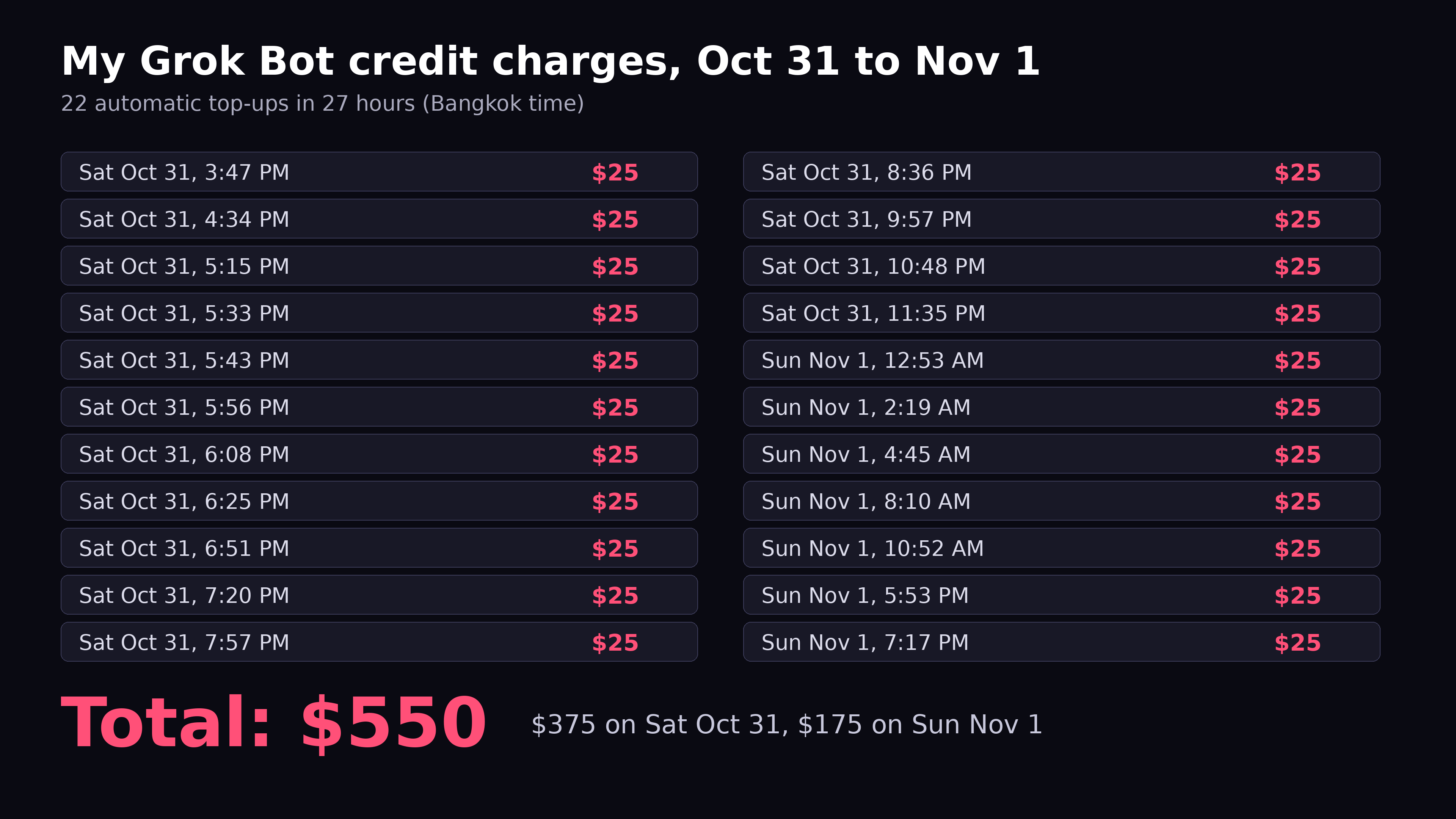






 Byte
Byte X Growth Bot
 www.skool.com/aisystems/about